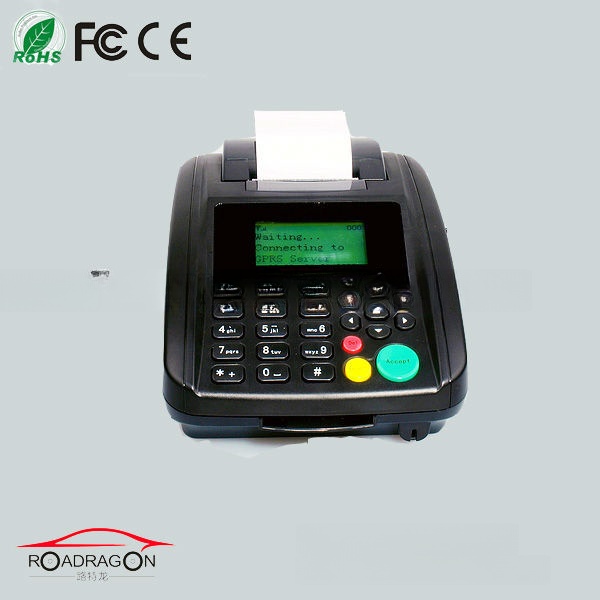
High quality gprs sms printer for online order printing or restaurant
This wireless GSM GPRS Printer can be use for order goods like food and other on internet,it is a good device
for retail shop,restaurant and other sellers.Usually use for receipt printing.
Highlights
Comunication mode :GPRS
Print mode :thermmo sensitive
Reminding with voice when there is order coming
Replaceable paper
Parameters:
Power souce : DC12V/3A
Storage temperature:-20~+80
Relative humidity :10%-95%
GSM frquency: GSM850/900/1800/1900MHz[optional]
Sensitivity: -102dBM
Transmitting power:<2w
Printing mode:thernisensitive
Width of printing paper :58mm
Valid printung paper: 48mm
Service life:50KM
Size 30*27*18cm
Weight :about 1.5kg
More details
Installation
1.Insert valid SIM card into SIM card seat
(Support GPRS function.For better GPRS data transmission, suggest prohibiting all voice and SMS functions in this SIM card)
2. Install GSM antenna
3. Connect power adapter
4. Switch on
GPRS Printer begins to initialize …
It will take almost 20 seconds to register. When registered successfully, GPRS Printer will try to connect server automatically.
For the first use, When GPRS Printer try to connect server, please pressCon/Disckey to stop. Because of you should set some parameters.
Settings
In the menu, you can make some settings through keyboard on GPRS Printer. When GPRS Printer stand by, pressMenukey, you can enter into sub-menu.
Menu
GPRS APN
GPRS IP
GPRS Port
GPRS User Name
GPRS Password
Printer ID
Print Speed
Order Message
Date
Time
IMEI Code
Product Model
Restaurant Name
Restaurant Add
Restaurant Tel
Clear Settings
Settings for GPRS connection:
(1) GPRS APN:
1. In the sub-menu, pressUporDownkey to move the cursor to GPRS APN, then pressMenukey.
2. Press numeral keys (0key to 9key) to entry the letters; Press*key to insert symbols
3. Setting finished, pressBackkey to save and exit
Now, takeCMNET.CNfor example.CMNET.CNis the APN for china mobile.
1. In the sub-menu, pressMenukey once
2. Press #key to capital letters. (ABC On the LCD, meaning capital letters)
3. Press 2key 3 times, C is ok;
Then, press 6key 1time, M is ok;
Then, press 6key 2 times, N is ok
Then, press 3key 2 times, E is ok
Then, press 8key 1 time, T is ok
Then, press *, then menu key, get the symbol of.
Then, press 2key 3 times, C is ok
Then, press 6key 2 times, N is ok
4. PressBackkey to save the settings and exit
Note:if wrong input, press Del key to delete the last letter
(2) GPRS IP:
1. In the sub-menu, pressUporDownkey to move the cursor to GPRS IP, then press
Menukey.
2. Press numeral keys (0key to 9key) to entry the numbers; Press * key to insert symbols
3. Setting finished, pressBackkey to save and exit
Now, server IP address is 192.168.1.100.
1. In the sub-menu, move the cursor to GPRS IP, then pressMenukey
2. Press # key to number. (123 On the LCD, meaning number)
3. Press 1key 1 time, 1 is ok;
Then, press 9key 1 time, 9 is ok;
Then, press 2key 1 time, 2 is ok
Then, press *, then menu key, get the symbol of.
Then, press 1key 1 time, 1 is ok
Then, press 6key 1 time, 6 is ok
Then, press 8key 1 time, 8 is ok
Then, press *, then menu key, get the symbol of.
Then, press 1key 1 time, 1 is ok
Then, press *, then menu key, get the symbol of.
Then, press 1key 1 time, 1 is ok
Then, press 0key 1 time1, 0 is ok
Then, press 0key 1 time, 0is ok
4. PressBackkey to save the settings and exit
Note:if wrong input, press Del key to delete the last number
(3) GPRS Port:
1. In the sub-menu, pressUporDownkey to move the cursor to GPRS Port, then pressMenukey.
2. Press numeral keys (0key to 9key) to entry the number
3. Setting finished, pressBackkey to save and exit
Now, GPRS Port is 23450.
1. In the sub-menu, move the cursor to GPRS Port, then pressMenukey
2. Press # key to number. (123 On the LCD, meaning number)
3. Press 2key 1 time, 2 is ok;
Then, press 3key 1time, 3 is ok;
Then, press 4key 1 time, 4 is ok
Then, press 5key 1 time, 5 is ok
Then, press 0key 1 time1, 0 is ok
4. PressBackkey to save the settings and exit
Note:if wrong input, press Del key to delete the last number
(4)Printer ID:
Normally, set the SIM card number as printer ID.
(5) GPRS User Name and GPRS Password:
For GPRS connection, User name and password is not a must in the most countries.
So call your GSM operator to confirm.
If User name and Password is a must in your country, please entry the related info,
Referencing to APN settings
For GPRS connection, APN, IP, Printer ID and Port is a must.
Settings for restaurant info:
Reference to APN setting, please set info of restaurant.
Restaurant Name,Restaurant AddandRestaurant Tel arein the sub-menu.
This info will show on the print note, so it is necessary.
......
Products Images
Installing Guidence
...
...
...